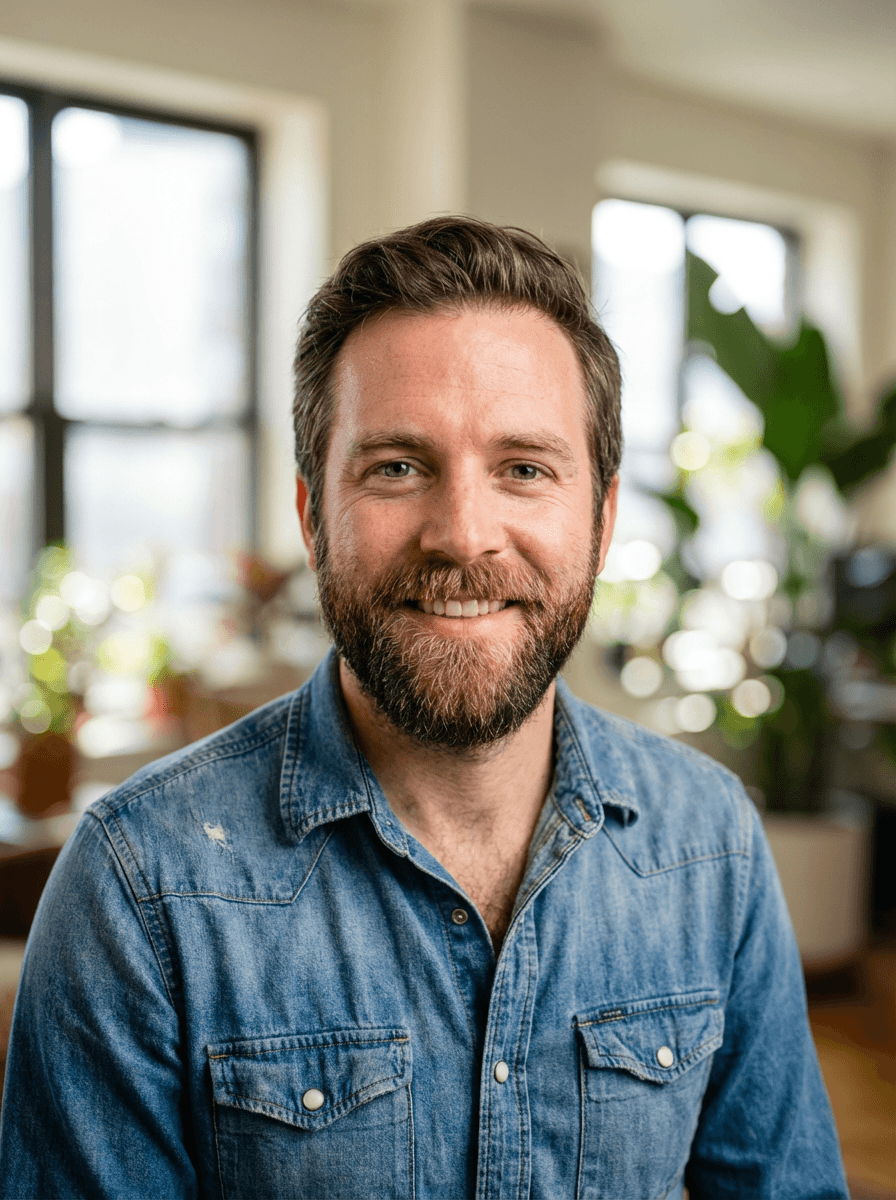
Your LinkedIn profile photo is not decoration. It is the single most viewed element of your professional online presence. LinkedIn's own data shows that profiles with a photo receive up to 21x more views and 36x more messages than those without. Recruiters, hiring managers, and potential clients process your image before they read a single word of your headline or experience.
Despite this, a large share of professionals still use outdated, poorly lit, or contextually wrong photos. Some use no photo at all. The barrier has historically been practical: hiring a photographer costs hundreds of euros, requires scheduling, and takes days or weeks to deliver results. AI headshot tools have removed that barrier almost entirely.
This guide covers what makes a strong LinkedIn headshot, how AI generation works in practice, and a step-by-step walkthrough for creating one using Northside Studio.
Why your LinkedIn photo matters more than you think
First impressions on LinkedIn happen in under a second. Research from Princeton's psychology department found that people form judgments about competence and trustworthiness from faces within 100 milliseconds. On a platform built around professional networking, that snap judgment directly influences whether someone clicks through to your profile, accepts your connection request, or responds to your message.
The numbers reinforce this. According to LinkedIn's own reporting, adding a profile photo makes your profile 14x more likely to be viewed by others. For professionals in competitive fields — consulting, tech, finance, sales — that visibility gap is not trivial.
Your photo also travels beyond LinkedIn. It appears in Google search results, email integrations, CRM tools, and conference speaker pages. A strong, current headshot compounds across every touchpoint where it surfaces.
What makes a good LinkedIn headshot
Not all professional photos work equally well on LinkedIn. The platform has specific visual conventions, and photos that deviate too far tend to underperform.
Framing and composition: Head and shoulders, face centered or slightly off-center. Your face should occupy roughly 60% of the frame. Tight crops that cut off your forehead or extreme wide shots with too much background both read poorly at LinkedIn's small display sizes.
Lighting: Even, diffused lighting that avoids harsh shadows. Natural light or soft studio light produces the best results. Overhead fluorescent lighting, strong backlighting, and direct flash all create unflattering effects that undermine perceived professionalism.
Background: Simple and non-distracting. Neutral tones, soft gradients, or slightly blurred environments work best. Busy backgrounds — restaurants, vacation scenes, crowded offices — pull attention away from your face.
Expression: A natural, relaxed expression with slight warmth. Full smiles work well for client-facing and creative roles. More neutral expressions suit executive, legal, and financial contexts. The key is authenticity — forced expressions read as exactly that.
Clothing: Aligned with your industry norms. A software engineer does not need a suit. A corporate lawyer probably should not wear a hoodie. Dress one level above your daily norm to signal intentionality without appearing disconnected from your actual environment.
Recency: Your photo should look like you today. If you have changed hairstyles, grown or shaved a beard, started wearing glasses, or changed significantly in appearance, your photo needs updating.
How AI headshots work for LinkedIn
AI headshot generation uses machine learning models trained on large datasets of professional photography. You provide reference selfies — typically 1 to 4 photos of yourself — and the model generates new images that preserve your identity while applying professional lighting, clothing, backgrounds, and composition.
The process differs from simple photo filters or editing apps. Rather than modifying your existing selfie, the AI creates an entirely new image based on what it learns about your facial features, proportions, and appearance. The result looks like it was taken in a professional studio, even though no camera was involved in producing the final output.
For LinkedIn specifically, AI tools excel because they solve the exact problems that make traditional headshots inconvenient:
- Cost: AI headshots typically run €10–€25 instead of €150–€500 for a photographer session.
- Speed: Results arrive in minutes, not days or weeks.
- Variation: You can generate multiple options with different clothing, backgrounds, and styles in a single session.
- Iteration: Updating your headshot quarterly or biannually becomes practical rather than expensive.
Step-by-step: creating your LinkedIn headshot
Here is the practical workflow for generating a LinkedIn-ready headshot using Northside Studio.
Step 1: Take your reference selfies. You need 1–4 clear selfies of yourself. Use natural or well-lit indoor light. Face the camera directly or at a slight angle. Keep your expression neutral or gently relaxed. Avoid heavy makeup, sunglasses, hats, or filters.
Step 2: Upload your selfies. After creating an account, upload your reference photos in the generation interface. The system accepts standard image formats and guides you if any photo has issues with resolution or clarity.
Step 3: Choose your clothing style. Select from professional clothing categories that match your industry.
Step 4: Choose your background. Options range from Neutral Studio and Corporate Clean to Modern Creative. For LinkedIn, Neutral Studio and Corporate Clean tend to perform best.
Step 5: Generate and review. The AI produces your headshot within minutes. Review the result for identity accuracy, expression, and overall composition.
Step 6: Download and upload to LinkedIn. Save the final image at full resolution and upload it directly to your LinkedIn profile. The recommended minimum size is 400x400 pixels, but higher resolution always looks better.
Tips for the best results
- Lighting in your selfie matters most. Stand facing a window during daylight. Even, soft light on your face is the single biggest quality factor.
- Use multiple reference photos. Providing 3–4 selfies from slightly different angles helps the AI build a more accurate model of your face.
- Keep backgrounds in selfies simple. A plain wall is ideal.
- Match your selfie appearance to your desired output. The AI preserves what it sees.
- Do not over-edit input photos. Avoid beauty filters, heavy saturation adjustments, or extreme contrast.
Common mistakes to avoid
Using an old or misleading photo. Your headshot should represent how you look now.
Choosing clothing or backgrounds that clash with your role. A creative director and a banking analyst should not have identical headshots. Match your visual presentation to your professional context.
Ignoring the circle crop. LinkedIn displays your photo as a circle. Check that your face remains well-centered after the circular crop is applied.
Skipping the update cycle. Even a strong headshot loses relevance over time. Plan to refresh your LinkedIn photo at least once a year.
Making the switch
If your current LinkedIn photo is more than two years old, was not taken professionally, or no longer reflects your current appearance, the return on updating it is disproportionately high relative to the effort involved. A better photo does not guarantee career outcomes, but it removes a common source of friction that costs you visibility and credibility on the platform every day it stays unchanged.
Create your updated LinkedIn headshot in minutes at Northside Studio.